
▽ Advertisement ▽
Every IDMLover Knows that IDM has the ability
to download Youtube videos with one click, but what if you want to download
the whole or some selected videos from Youtube Playlist. IDM also has a
solution for this.
Here is a piece of good news for you, You can download a youtube playlist
using IDM after following these simple steps I talk about later in the post
on How to Download Youtube Playlist using IDM.
And if you are facing problems while downloading youtube videos with IDM you
can read this post as a solution
Youtube Video Download Panel not showing issue Fix
So now let’s move on to the
steps to Download YouTube Playlist with IDM or Internet Download Manager.
Download YouTube Playlist with IDM

In the process to
download youtube playlists using Internet Download Manager(IDM) you
don’t need to install other software on your windows pc like to
download mega files using IDM.
New Method to Download YouTube Playlist Videos at Once
After 22 April the previous method to save youtube playlist videos with IDM
does not work, you will get “not found” error on the youtube playlist
downloadable link generator website.
But don’t worry IDMLover find the solution, here are the steps you need to
take to download youtube playlist videos at one click in 2023.
-
Go to https://youtubeplaylist.cc/
and create a Free Account [Use Temp Mails for that] -
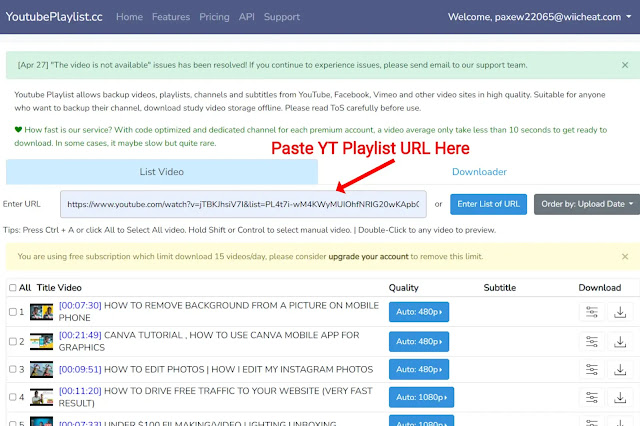
Copy Youtube playlist URL and paste it on the site.
-
Select 15 Videos [This site has 15 videos/day limit per free account]
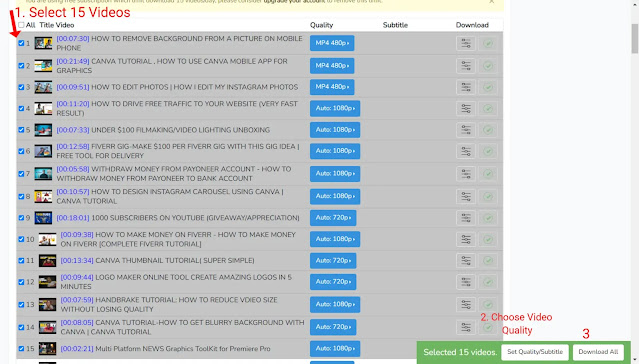
- Now select the video quality and click on ‘Download All’
-
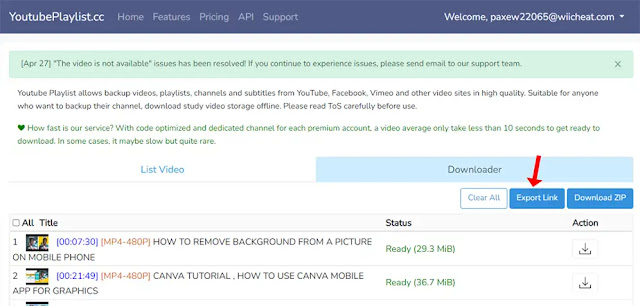
Wait until the process is done then click on ‘Export Link’
-
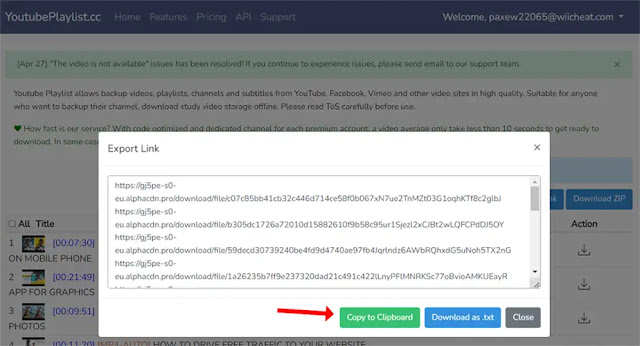
After that click on ‘Copy to Clipboard’
-
Now open IDM, click the Tasks option in the top left corner of Internet
Download Manager, and select Add batch download from clipboard.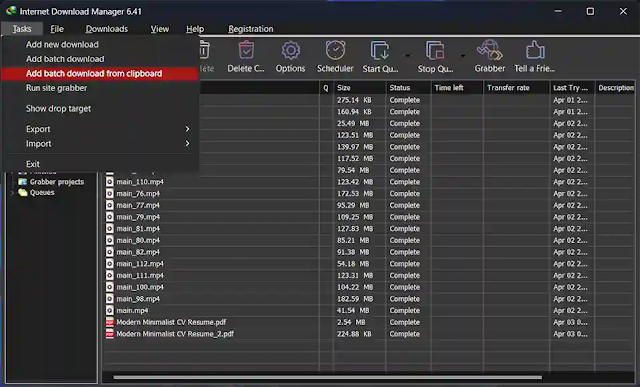
-
Then select the videos using the Check all button.
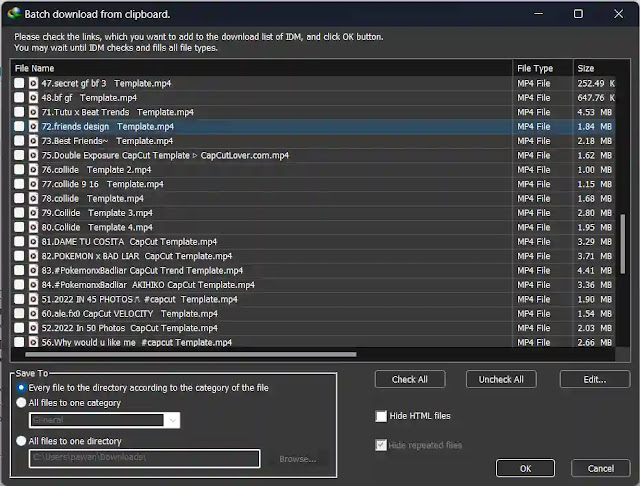
- Now Name the Queue as you want and click on Start.
- That’s all 🥳 [Is it working? Tell me in the comment]
This site only allows you to download 15 videos/day with a free account. so
once you reach the daily limit create a new account with the help of Temp
Mails and download the rest videos of the playlist.
Steps to Download Youtube Playlist in IDM [Old Method]
- First of all, go to youtube and open the playlist you want to download.
-
Then copy the youtube playlist URL
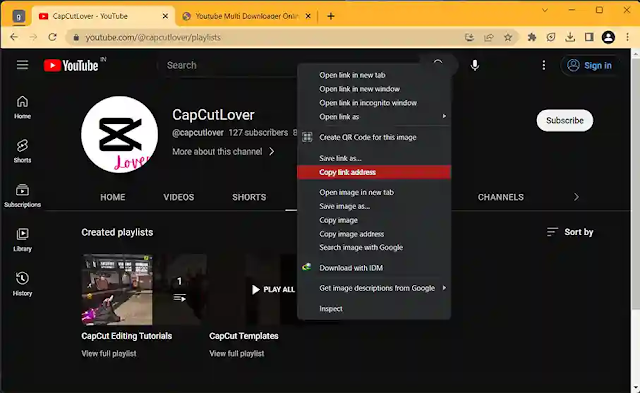
-
Now
click here
and you will redirect to the youtube playlist downloader.
Note: Don’t think that I am using the youtube playlist download to download
youtube video playlist. We just need the whole youtube playlist videos URL
separately that uses you see in the next step
-
Now paste the youtube playlist URL you copy from youtube in the Youtube
Playlist downloader address session -
Then copy the complete YouTube Playlist Videos Download URL
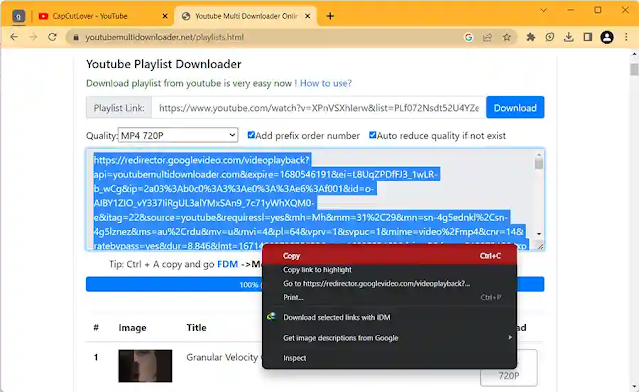
-
Now open IDM, click the Tasks option in the top left corner of Internet
Download Manager and select
Add batch download from clipboard.
select the videos you want to download from the Youtube Playlist or select
the whole playlist using the Check all button.
That’s all 🥳 you have done all the steps to download a youtube playlist
using IDM
Note: If the YouTube Playlist has more the 100 Videos then once select the
first 100, and create a Queue of them then select the rest by putting the
URL copied from the YouTube Playlist Downloader site and select the same
Queue you created first.
Now It’s Your Turn
Because if you don’t follow these steps you have only one way to download a
youtube playlist using IDM by downloading every video of the playlist
separately using the IDM youtube video download panel.
share your feedback on this post via commenting below the post.