
▽ Advertisement ▽
🙏🏻 Hello
IDMLover, If you are using Mozilla Firefox browser and already installed IDM
in your windows pc but don’t integrate IDM Add-on with firefox, you can’t
enjoy your downloading possess because to use IDM Download Manager features
like:-
1). VIDEO DOWNLOAD PANEL
2) FASTER SPEED
you need to
add IDM (Internet Download Manager) Extension in Firefox
Browser.
😀 So, In this post, you know how you can
Add IDM Integration Module to Mozilla Firefox.

How to Install IDM Extension in Firefox
There are two main ways to integrate IDM Extension in Firefox browser
but before move on to them, I suggest you follow these steps or check that you
already done steps on your windows pc. If you don’t done yet these steps then
first apply them.
but before move on to them, I suggest you follow these steps or check that you
already done steps on your windows pc. If you don’t done yet these steps then
first apply them.
-
Make sure you are using the
latest version of IDM (Internet Download Manager) and
Mozilla Firefox. -
“Use advance browser integration“, tick mark on “Mozilla Firefox” in IDM option.
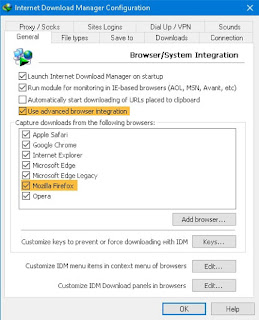
- Now reopen your firefox browser and you see a message “IDM Integration Module added to Firefox” in Firefox menu by clicking on three bots.
-
Click on the message and enable IDM extension. (Don’t worry if this not
happen because there are more way to integrate IDM in firefox) -
If you already installed an old IDM extension in Firefox then remove it
from there and try to reinstall by following the steps I mentioned below.

Integrate IDM with Firefox using IDM xpi file
In this method, we use IDM xpi file to Add IDM Extension to Firefox manually.
Download IDM CC for Firefox from here…
https://bit.ly/3phIOZU
Password:- IDMLover
- Download IDMCC for Firefox RAR from the given link.
-
Open Firefox and
press ctrl+shift+A or open Firefox addons tab via three lines/dots. - Now click on the setting icon.
- Then select Install Add-on From File option.
-
Select the xpi file according to the version of
Firefox you are using.
Here you see 3 XPI files, they all have similar file names so choose the
right one according to the version of your Firefox web browser.
right one according to the version of your Firefox web browser.
- Select idmmzcc3.xpi for FireFox 53 and newer versions.
- Select idmmzcc2.xpi for Firefox from version 27 to version 52 inclusively.
- Select idmmzcc.xpi (without a number) for Firefox from version 1.5 to version 26 inclusively.
Now move back on the integration steps...
-
Now if select the right xpi, Firefox will show you a confirmation
message, click on Add button. - Done!😍
If you don't know the version of your Firefox web browser then go to
its about section.
Integrate IDM with Firefox using IDM Add-on
You can say that in this method to add IDM in firefox we are going to use
Internet Download Manager Integration Module Firefox Addon.
Internet Download Manager Integration Module Firefox Addon.
-
Open this post in your Firefox Browser and
Click Here -
By click on the link, you will redirect to
Firefox IDM Addon page. -
Just install this addon in your firefox web browser and
start using IDM features in Firefox.
Comment & Give Feedback:)
I hope you find this post helpful and useful if you are searching for IDMCC
For Firefox, get idmcc, Add IDM in firefox, Integrate IDM with Firefox, or
Download IDMCC.
For Firefox, get idmcc, Add IDM in firefox, Integrate IDM with Firefox, or
Download IDMCC.
Now I request you to share your feedback about this post via comments and
tell us which method is working for you to Integrate the Internet Download
Manager Integration Module with Firefox.
tell us which method is working for you to Integrate the Internet Download
Manager Integration Module with Firefox.
If you have any question related to this post then must inform me, I will
reply as soon as possible.
reply as soon as possible.
😇 Thanks for Visiting IDMLover 😇