
▽ Advertisement ▽
Hello IDMLover,
Microsoft has replaced Internet Explorer with a brand new Microsoft Edge web
browser with Modern UI and User-Friendly Expression.
Same as you I am also facing a problem with Internet IDM (Internet
Download Manager) with Microsoft Edge Windows browser on my PC.
But don’t worry the steps are so simple to
Add IDM Extension in Edge.
Just follow them.

Integrate IDM with Edge using IDMCC
https://www.idmlover.com/p/idm-cc-download-latest.html
- Download IDM CC for Microsoft Edge web browser from the given link.
- Open Microsoft Edge web browser Extension page.
- Enable Developer mode.
-
Now drag and drop the downloaded CRX file into Edge Extension/Addon
tab. - Click on Add extension.
- You have successfully installed IDM into Edge manually.
- Customize IDM Integration Module settings according to you.
- That's All:)
Add IDM with Microsoft Store
Before you jump on the Intergate steps make sure you tick the mark on "Use
advanced browser integration" and On "Microsoft Edge" in Internet Download
Manager options.
-
Open this page in your Microsoft Edge web browser and simply
Click Here.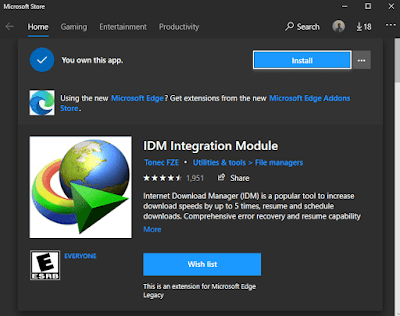
-
Now install IDM integration module by clicking on the "Install" button in
Microsoft Edge.

That's all, You see how easy it is.
Also Read:-
Remove IDM from Microsoft Edge
-
First, click on three dots in the top right corner then select
Extension Option from the list. -
Now you see all the extensions you have added to Microsoft Edge web
browser - Find IDM and click on the setting icon on it.
-
Then click on the "Uninstall" button and a popup comes on your Windows
screen asking the permission to uninstall IDM Integration Module from
Edge, simply click on "Ok"
FAQs
How can I use IDM in Edge browser?
If you already add IDM in Microsoft Edge then enable it in Edge Extension
and if not then simply follow the steps to add Internet Download Manager in
Edge I talk above.
and if not then simply follow the steps to add Internet Download Manager in
Edge I talk above.